R+ AI Radiology prior authorization

Get imaging cases ready to submit.

R+ AI gives imaging teams one place to organize referral records, draft letters of medical necessity, message the physicians involved, and track the payer’s decision.

R+ AI CASE WORKSPACE

SAMPLE CASE / 024

Lumbar spine MRI

In review

Source records

Imaging orderTranscription reviewed
Progress notesSource page linked
Therapy summarySource page linked
LETTER OF MEDICAL NECESSITY

Requested study

MRI lumbar spine without contrast
↳ Source evidence linked
Intake Draft Review Follow-up
Illustrative R+ AI workspace · fictional case

One case, three handoffs

  • Imaging intake
  • Physician review
  • Payer follow-up

The R+ AI workflow

From referral to payer follow-up.

Give each team a clear next step and keep the documents, draft, and decision history together.

  1. 01

    Assemble the record

    Attach orders, scanned notes, and supporting PDFs. Review extracted text against the original pages before using it in a draft.

  2. 02

    Draft with evidence

    Generate a starting letter from reviewed records. Follow links back to source pages and check the questions R+ AI flags for the clinician.

  3. 03

    Coordinate with physicians

    Ask involved physicians for missing records in private case conversations. Route the draft to the referring physician for review and electronic signature.

  4. 04

    Track the outcome

    Download the signed packet for your submission channel, then log the payer’s decision, authorization details, and follow-up.

Product walkthrough · 63 seconds

See R+ AI in action.

Follow a fictional imaging case from the worklist through physician messaging, sign-off, and payer follow-up.

Download the MP4 · Read the case messaging guide ↗

Read the video transcript
  1. Start in the worklist. Find the imaging case and check its status.
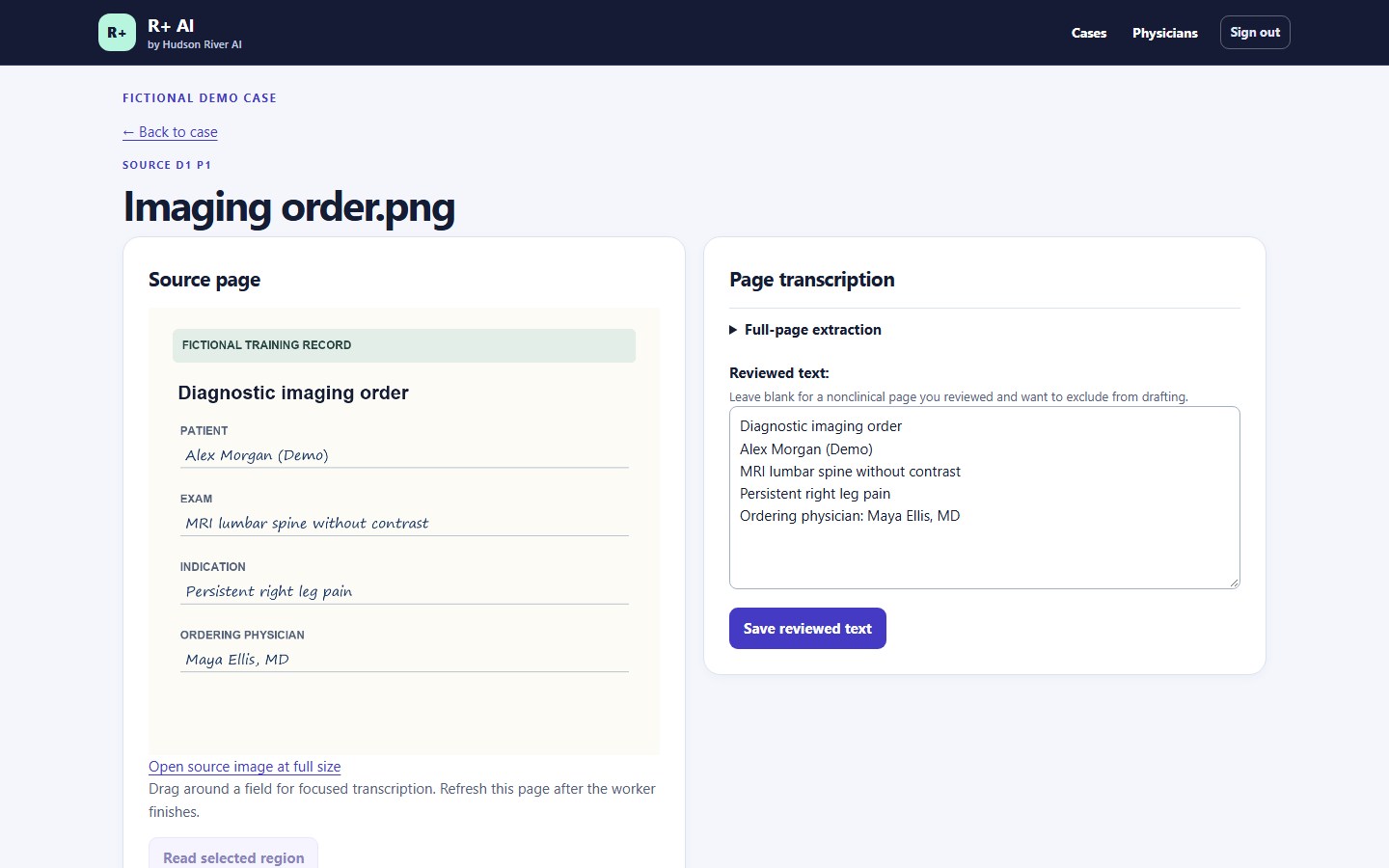
  2. Review the scanned order side by side with the extracted text. Correct details before drafting.
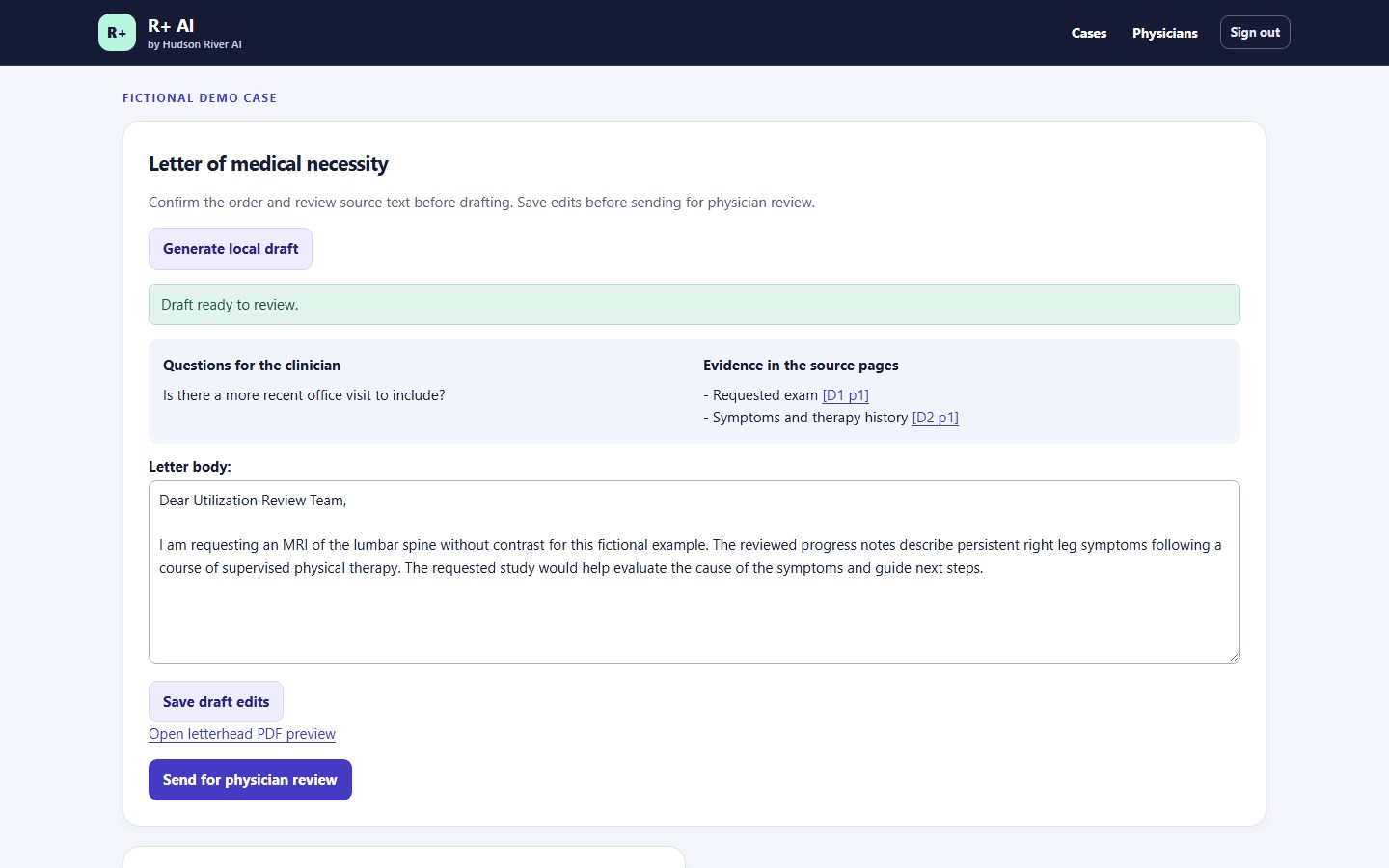
  3. Generate a letter of medical necessity and follow the evidence links to source pages.
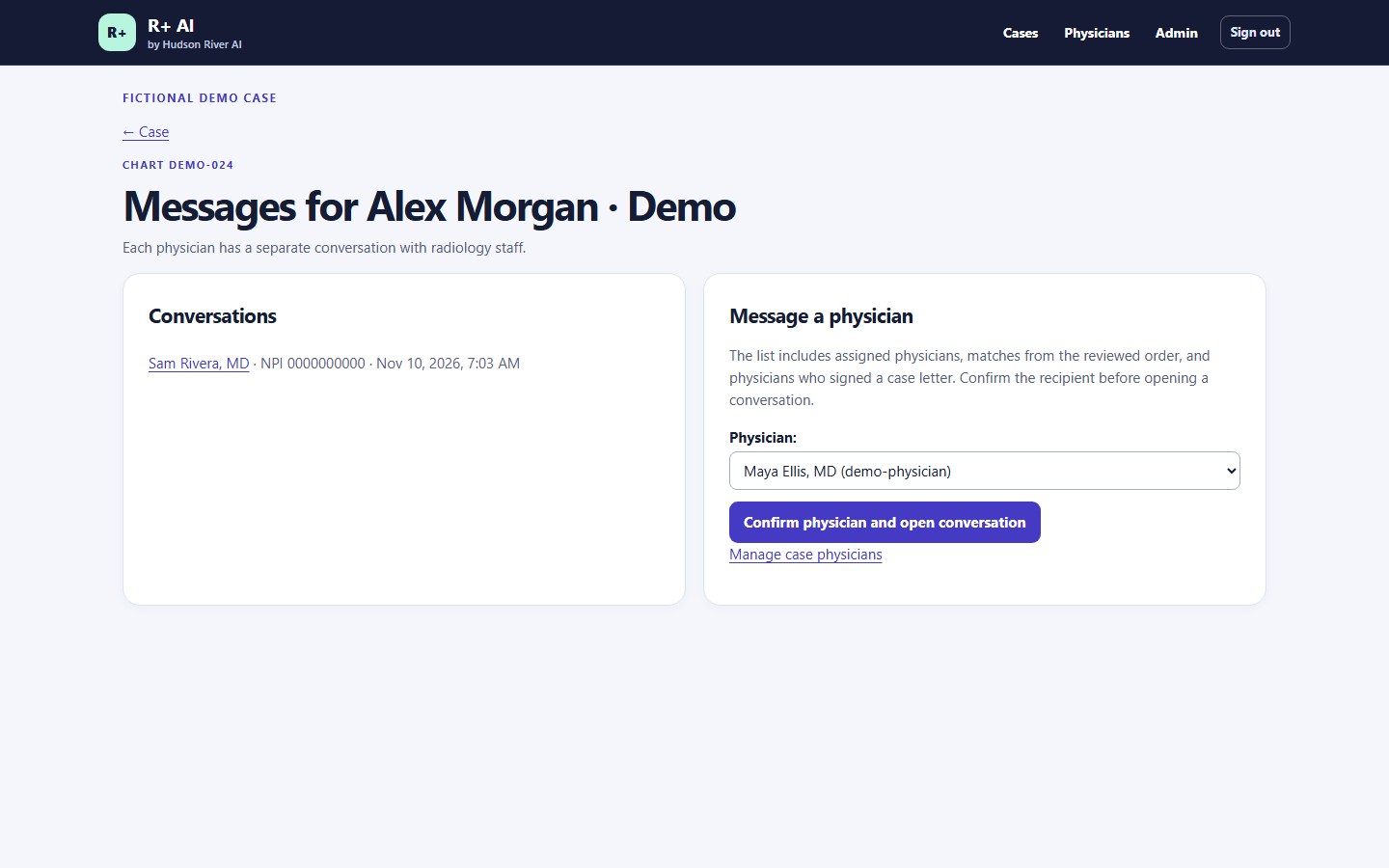
  4. In Messages, confirm a physician from the case assignments, the reviewed imaging order, or a signed case letter.
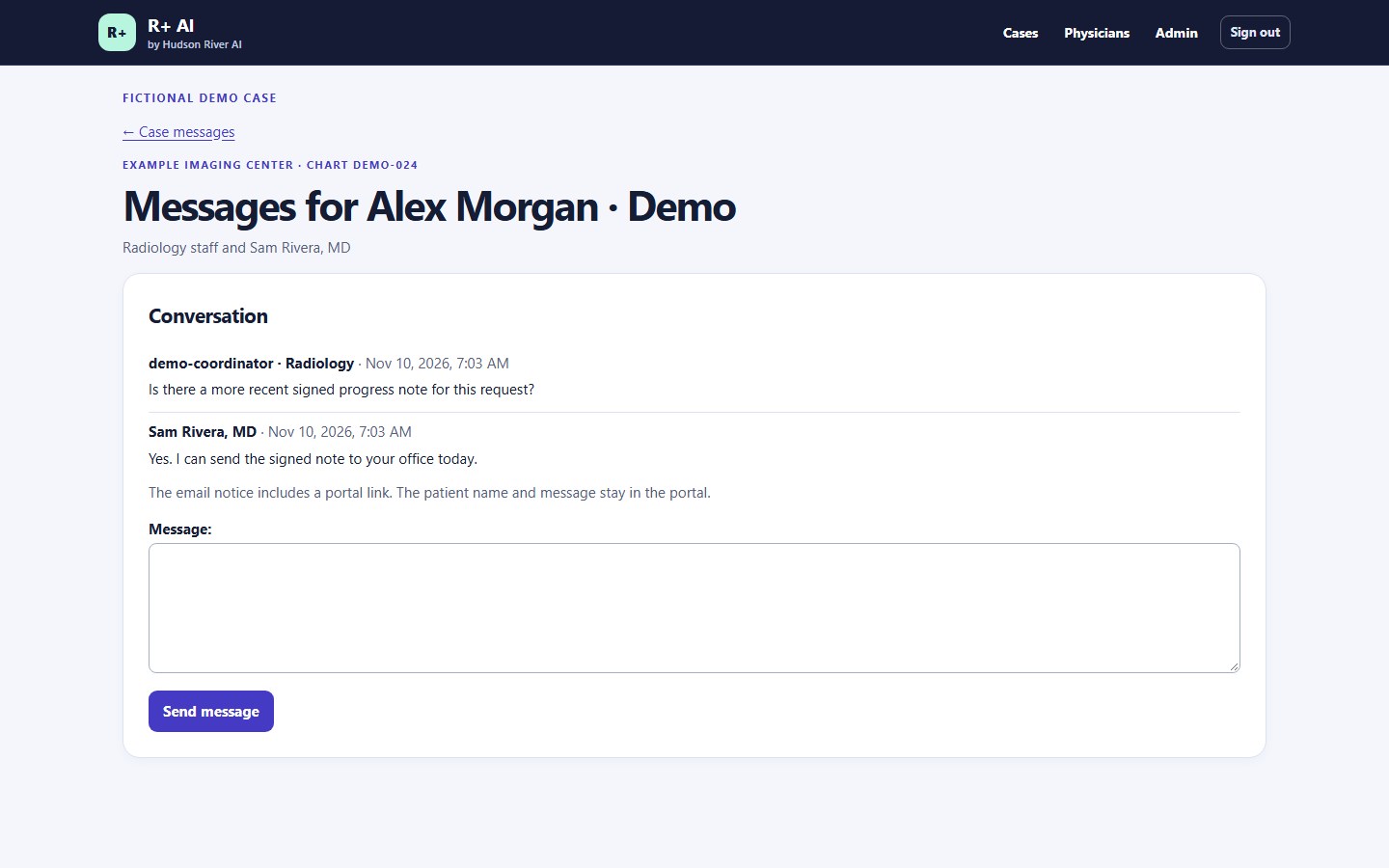
  5. Ask for the missing note in a private conversation. The physician receives a generic email with a sign-in link and replies in R+ AI.
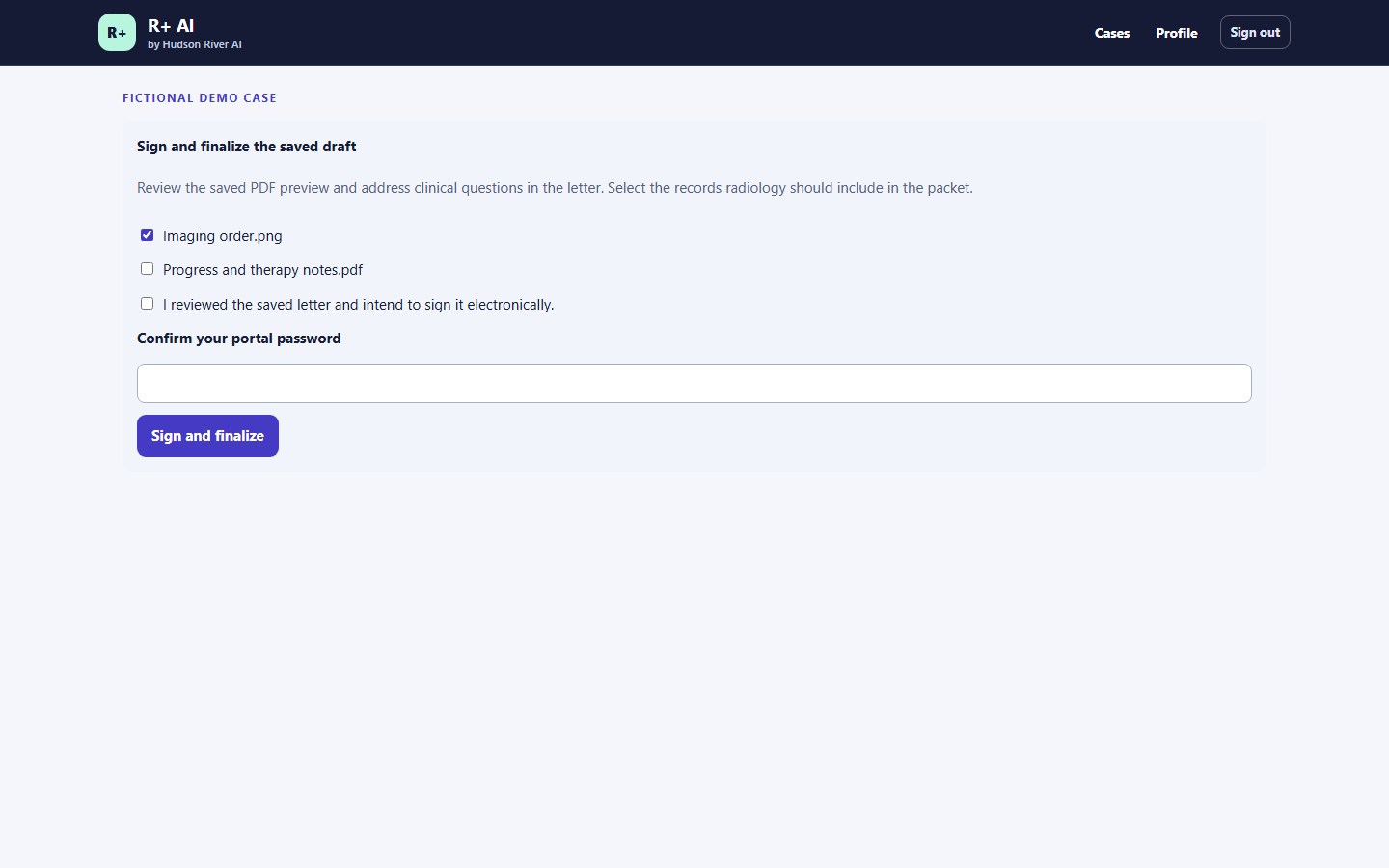
  6. Have the referring physician review the letter and select the supporting records before signing.
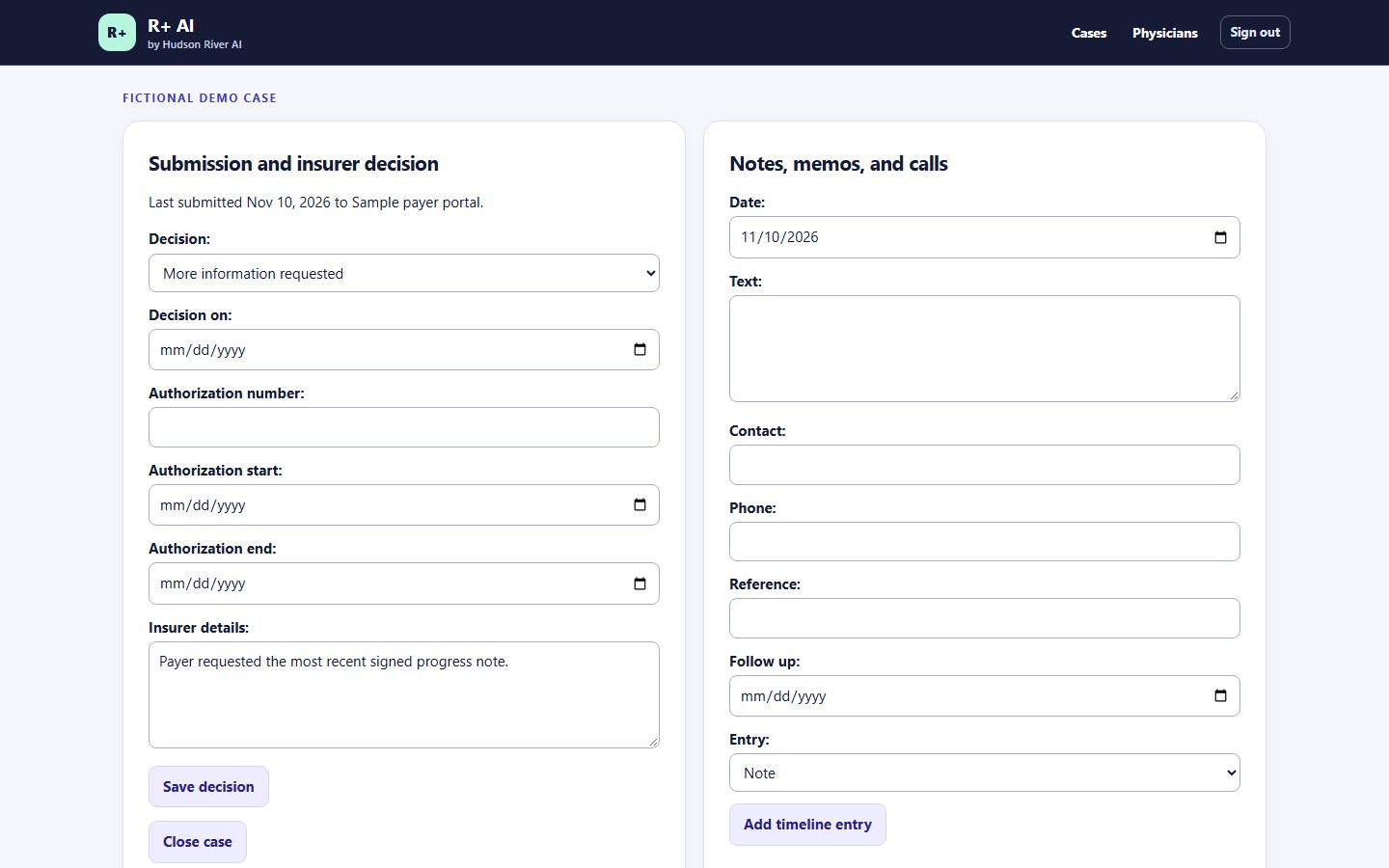
  7. Record the submission, capture the payer’s response, and schedule follow-up.

R+ AI application screens with fictional data. Select an image to view it at full size.

Use cases

Where R+ AI fits into the work.

SAMPLE CASE / LUMBAR SPINE MRI

A handwritten order arrives.

The imaging coordinator attaches the order and supporting visit notes. R+ AI reads the scanned order, and the coordinator confirms the exam and physician against the image.

REVIEWED ORDERMRI lumbar spine without contrast Ready for letter drafting

SAMPLE CASE / LUMBAR SPINE MRI

The physician has a draft to review.

R+ AI creates a letter from reviewed visit notes and a therapy summary. The physician follows the evidence links, edits the rationale, previews the letterhead, and signs the final version.

PHYSICIAN REVIEWReview, edit, and sign the draft Signed letter available as a PDF

SAMPLE CASE / LUMBAR SPINE MRI

A second physician has the latest note.

The coordinator selects the physician involved in the case and asks for the missing note in R+ AI. The email contains a generic notice and a sign-in link. The physician reads the request and replies in their own case conversation.

CASE MESSAGINGRequest the signed progress note Physician reply saved in the case

SAMPLE CASE / LUMBAR SPINE MRI

The payer asks for another document.

The coordinator records the request and schedules a follow-up. Once the payer responds, the team can record the decision, authorization dates, and reference number in the same case.

PAYER FOLLOW-UPAdditional documentation requested Follow-up date recorded

Illustrative walkthrough using fictional details.

Pricing

R+ AI plans for radiology teams

Prepare prior authorization packets, get referring physician sign-off, and track insurer decisions in one workspace.

Starter

$2,500 / month

Who it’s for
One outpatient imaging location with a smaller authorization workload.
Included volume
1,200 cases per year (equivalent to 100 per month)
What’s included
Record uploads and text extraction, draft letters of medical necessity, case messaging with involved physicians, referring physician editing and electronic signature, signed packet export, and insurer decision tracking.
Request a demo

Enterprise

$10,000 / month

Who it’s for
One hospital radiology department or up to three imaging locations.
Included volume
6,000 cases per year (equivalent to 500 per month), shared across included locations.
What’s included
Everything in Imaging Center, plus hands-on onboarding, staff training, workflow configuration, and priority support. Standard managed deployment will be included once available.
Custom integrations
Integration planning included. Custom connections to EHRs, radiology information systems, or clearinghouses are quoted separately.
Request a demo

Case allowances are pooled across the year. Each authorization request opened in R+ AI counts as one case, including added records, letter revisions, reminders, and decision updates.

Your facility submits the exported packet through its existing payer or clearinghouse workflow.

Hudson River AI

AI for the work around patient care.

Hudson River AI builds tools for the administrative work that happens between an imaging order and an insurer’s decision. R+ AI is our first product, focused on diagnostic imaging prior authorization.

Staff verify source records, physicians approve the letters they sign, and imaging teams submit through their existing payer channels.

R+ AI questions and demos

Contact Hudson River AI

Message us to ask about R+ AI or request a live demo.